정보기기운용기능사 과정평가형 작업형 공개문제(4형) 풀이
정보기기운용기능사 과정평가형 작업형 공개문제(2형) 풀이 참고(IP 주소 및 장치 설정, VLAN 설정에 차이가 있으며 유형은 동일)
[공개과제 4형 문제지]
[공개과제 4형 (작업형 시험용) 토폴리지]
(다운로드 받을 실습 파일) [공개과제 4형 (실습용) 토폴리지]
< 스스로 실습해 보기 > ------------------------------------------------
1. PC 및 Server에 IP 설정하기
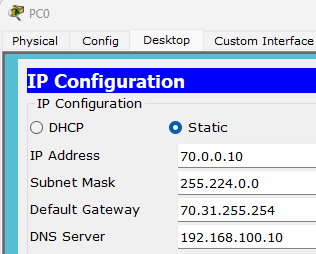
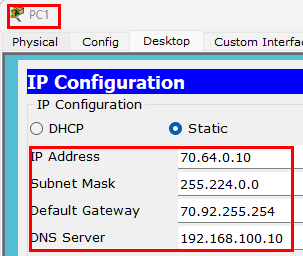
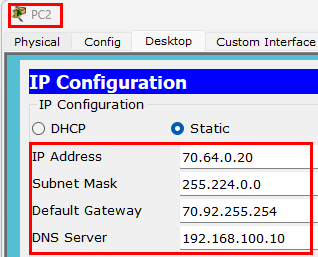
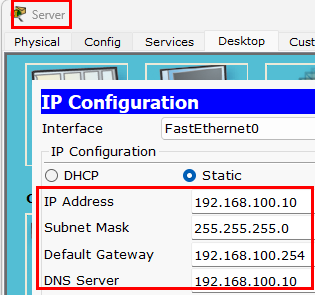
2. 스위치 설정(SW1 클릭 후, CLI 탭)
Switch#conf t
Switch(config)#hostname SW1
SW1(config)#vlan 10
SW1(config-vlan)#name Student
SW1(config-vlan)#vlan 20
SW1(config-vlan)#name Teacher
SW1(config-vlan)#int r f0/1-5
SW1(config-if-range)#sw mo ac
SW1(config-if-range)#sw ac vl 10
SW1(config-if-range)#int r f0/6-11
SW1(config-if-range)#sw mo ac
SW1(config-if-range)#sw ac vl 20
SW1(config-if-range)#int f0/24
SW1(config-if)#switchport mode trunk
SW1(config-if)#switchport trunk allowed vlan 10,20
3. 라우터 설정(R1 클릭 후, CLI 탭)
< 라우터 이름 수정, 배너 설정, SSH 접속을 위한 도메인 생성, 유저 생성>
Router#conf t
Router(config)#hostname R1
R1(config)#enable secret skills##
R1(config)#banner motd ~$$ Staff only! $$~
R1(config)#ip domain-name CBQ.net
R1(config)#username process password test!!
R1(config)#crypto key generate rsa
% Do you really want to replace them? [yes/no]: yes
The name for the keys will be: R1.CBQ.net
Choose the size of the key modulus in the range of 360 to 2048 for your
General Purpose Keys. Choosing a key modulus greater than 512 may take
a few minutes.
How many bits in the modulus [512]: [키보드 엔터키를 칩니다]
% Generating 512 bit RSA keys, keys will be non-exportable...[OK]
R1(config)#line vty 0 4
R1(config-line)#login local
R1(config-line)#transport input ssh
R1(config-line)#exit
< inter-VLAN 설정>
R1(config)#int f0/0
R1(config-if)#no sh
R1(config-if)#int f0/0.10
R1(config-subif)#en do 10
R1(config-subif)#ip add 70.31.255.254 255.224.0.0
R1(config-subif)#int f0/0.20
R1(config-subif)#en do 20
R1(config-subif)#ip add 70.92.255.254 255.224.0.0
< R1 Se0/0/0 포트 IP 설정 >
R1(config)#int s0/0/0
R1(config-if)#ip add 204.120.12.77 255.255.255.252
R1(config-if)#no sh
4. 라우터 설정(R2 클릭 후, CLI 탭)
< 라우터 이름 변경, R2 Se0/0/0 포트, Fa0/0 포트 IP 설정 >
Router>en
Router#conf t
Router(config)#hostname R2
R2(config)#int s0/0/0
R2(config-if)#ip add 204.120.12.78 255.255.255.252
R2(config-if)#no sh
R2(config-if)#int f0/0
R2(config-if)#ip add 192.168.100.254 255.255.255.0
R2(config-if)#no sh
5. 정적 라우터 설정(R1, R2 클릭 후, CLI 탭)
< R1 에서 >
R1(config)#ip route 192.168.100.0 255.255.255.0 204.120.12.78
< R2 에서 >
R2(config)#ip route 70.0.0.0 255.224.0.0 204.120.12.77
R2(config)#ip route 70.64.0.0 255.224.0.0 204.120.12.77
6. (채점, 확인작업) 모든 설정이 완벽하게 되었으면 편지봉투(PDU) 신호가 전달(Successful) 되야 함.
< 아래 이미지 처럼 편지 봉투를 클릭 후, PC0 클릭 후 서버 클릭, 반복해서 PC1, PC2 >
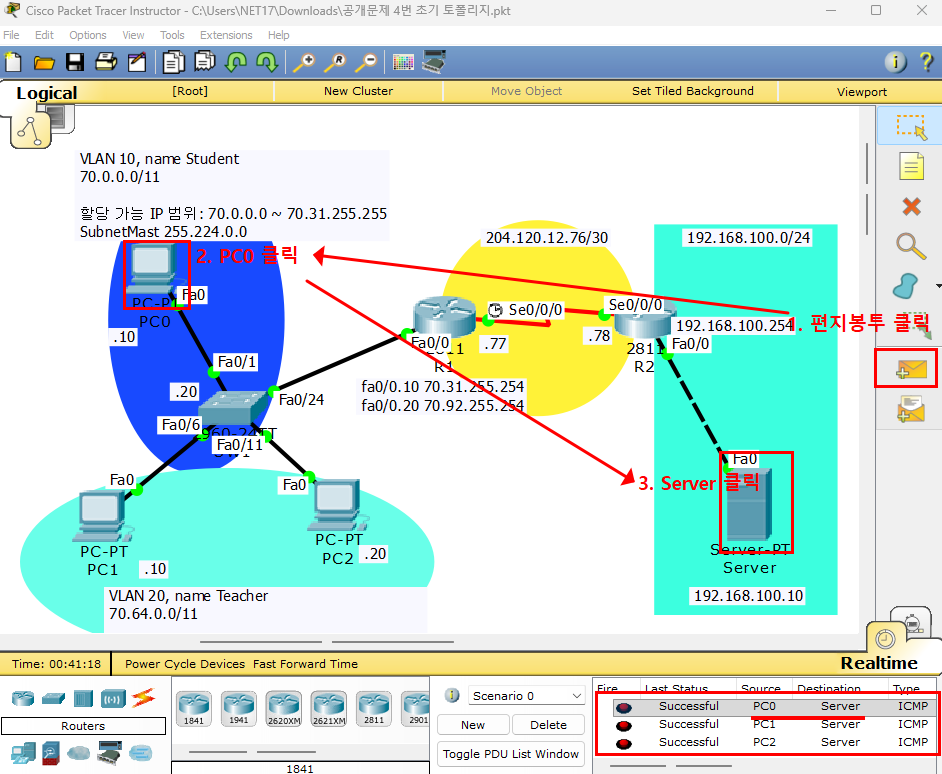
< 학급별 실습 진도 토폴리지 > ------------------------------------------------------------------------------
>> 2학년 3반 실습 진도
>> 2학년 4반 실습 진도